


Creating my Social Media Page
- delfinastevens
- Mar 27, 2022
- 2 min read
Amongst all the social media plataforms there are such as Facebook, Instagram or Twitter,

I chose Instagram since it has many different features I can use to make my project more interesting such as reels which are Instagram's own version of Tik Toks. I can also post stories, which also include many features such as a question box, countdowns, you can add music, questionnaires, hyper links, the audience can tell you how much they like a story... All of this will help me be
more creative and attract more audience.
I also chose Instagram because it has 1.393 billion monthly active users, plus my target audience is on this platform rather than Facebook which is for a older target audience.
To post pictures I used an app called "PhotoSplit"...

I used it to create mosaics on my instagram feed, so when the users first enter my page, they see a big picture instead of many little ones (normal feed).
This technique is normally used by big companies in their instagram to make it look professional. I have seen this been done by brands such as "Off White".
Here is a picture of how I made a picture simple picture that normally covers one post into 6:
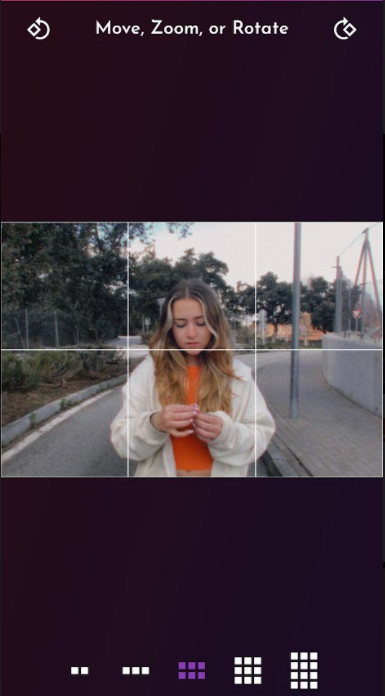

As you can see I can chose on hw many posts I want it, 2, 3, 6, 9 or even 12
And here is the final result:
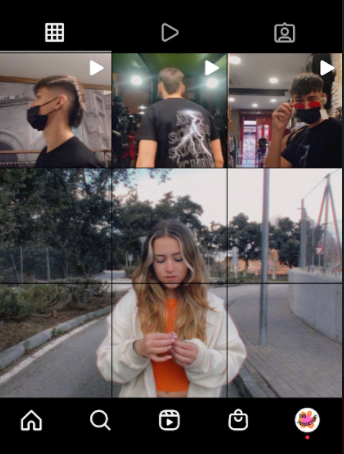
Here is how my feed ended up looking...
I think this technique will benefit my social media page since it's easy, free, quick and looks professional.
I also changed each of the names for each highlight of story, normally you would give each highlight a name but instead I wrote a sentence which is read when you look at all the highlights together.




Comments